Mocking Date
Storybook addon that mocks the JavaScript Date — and opt-in Temporal and Intl.DateTimeFormat — for individual stories.
Storybook Addon Mocking Date
A Storybook addon that mocks the current time — Date, Temporal.Now, and Intl.DateTimeFormat — for individual stories using @sinonjs/fake-timers. Useful for components that read the current date or time and need deterministic snapshots, visual regression tests, or coverage of time-sensitive UI such as relative timestamps and seasonal greetings.
export const Christmas = meta.story({
  parameters: {
    mockingDate: '2024-12-25T12:00:00Z',
  },
});
Requirements
- Storybook
^11.0.0(stay on 3.x for Storybook 10) - Node.js
>=22.12.0(Storybook 11's own requirement) - Renderer-agnostic — the addon installs the mock from a preview
beforeEachhook, which works with any Storybook framework (React, Vue, Svelte, etc.)
Installation
First, install the package.
npm install --save-dev storybook-addon-mock-date
Then, register it in two places: .storybook/preview.ts installs the mock, and .storybook/main.ts adds the toolbar.
// .storybook/preview.ts

// Replace your-framework with the framework you are using (e.g., react-vite, vue3-vite)
import { definePreview } from '@storybook/your-framework';
import mockDate from 'storybook-addon-mock-date';

export default definePreview({
  // ...rest of preview
  addons: [mockDate()], // 👈 installs the mock
});
// .storybook/main.ts

// Replace your-framework with the framework you are using (e.g., react-vite, vue3-vite)
import { defineMain } from '@storybook/your-framework/node';

export default defineMain({
  // ...rest of config
  addons: [
    'storybook-addon-mock-date', // 👈 adds the toolbar
  ],
});
Don't skip the preview.ts entry. Once preview.ts calls definePreview (CSF Next, Storybook 11's default), Storybook ignores the preview annotations that addons register through main.ts, so without it the mock is never installed and every story silently sees the real clock. Registering through definePreview also types the mockingDate parameter and global in preview.meta() and meta.story().
npx storybook add storybook-addon-mock-date also works. It adds the main.ts entry and puts import * as storybookAddonMockDate from 'storybook-addon-mock-date/preview' into definePreview's addons, which installs the mock but leaves mockingDate untyped — replace it with mockDate() to get the types.
Still on CSF 3 (a plain-object preview.ts and Meta / StoryObj stories)? See With CSF 3 stories.
Usage
The mockingDate parameter
Pass a Date, a millisecond timestamp, an ISO 8601 string, or a Temporal.Instant / Temporal.ZonedDateTime via the mockingDate parameter at the story, meta, or preview level. Every API that reads the current time — Date, Temporal.Now, and zero-argument Intl.DateTimeFormat#format — then returns that instant (see What gets mocked).
// Button.stories.ts
import preview from '#.storybook/preview';

import { Button } from './Button';

const meta = preview.meta({
  component: Button,
  parameters: {
    mockingDate: new Date(2024, 3, 1),
  },
});

export const AddParametersAtStory = meta.story({
  parameters: {
    mockingDate: new Date(2023, 6, 1),
  },
});

export const AddParametersAtMeta = meta.story();
// .storybook/preview.ts
export default definePreview({
  addons: [mockDate()],
  parameters: {
    mockingDate: new Date(2024, 0, 1),
  },
});
Storybook merges parameters with the most specific value winning, so the precedence is story > meta > preview. Object forms (below) merge key by key across levels, so a story's { fake: [...] } keeps a preview-level { now }; a bare date at the preview level is replaced whole by a story's object form.
The mock lives as long as the story. It is installed before the story's own beforeEach hooks run — so they already see the mocked time — and removed when Storybook tears the story down, so a mocked story never leaks its clock into the next one. A story whose merged mockingDate is undefined runs on the real clock.
The object form
mockingDate also takes an object, in one of three shapes:
| Shape | Effect |
|---|---|
{ now, fake? } |
Freeze the clock at now. fake picks which APIs to fake; it defaults to the clock readers ['Date', 'Temporal', 'Intl']. |
{ fake: [...scheduling APIs] } |
Intercept timers without a date. The clock readers stay real; the timers run on a clock that starts at the epoch. |
{ disable } |
true runs the story on the real clock, ignoring any inherited mockingDate and the toolbar. false re-enables it in a disabled meta. |
A fake array of clock readers without a now would mock nothing, so the type rejects it — add a now, or drop the clock readers from fake.
Faking timers
Scheduling APIs like setTimeout / setInterval / requestAnimationFrame / performance stay real until you list them in fake — its values map directly to @sinonjs/fake-timers' toFake:
export const Toast = meta.story({
  parameters: {
    mockingDate: {
      now: '2024-01-01T00:00:00',
      // intercept the auto-dismiss timer so the toast never races the screenshot
      fake: ['Date', 'Temporal', 'Intl', 'setTimeout', 'clearTimeout'],
    },
  },
});
An explicit fake array replaces the default entirely, so list the clock readers you still want frozen next to the timers — { fake: ['setTimeout'] } fakes only setTimeout and leaves Date real.
The same rule keeps an API on the real clock: leave it out of an explicit fake array — for example when a library trips over the Intl fake:
export const ChristmasBanner = meta.story({
  parameters: {
    mockingDate: {
      now: '2024-12-25T12:00:00Z',
      // keep Intl.DateTimeFormat native for a library that subclasses it
      fake: ['Date', 'Temporal'],
    },
  },
});
rAF needs
performance. Animation libraries (framer-motion, react-spring, GSAP, Lottie, three.js) compute their delta fromperformance.now(), so fakerequestAnimationFrameandperformancetogether — faking rAF alone leaves the solver with a zero/NaN delta.
A zero-delay
setTimeoutstill runs. Only timeouts of at least 1 ms wait for the clock:setTimeout(fn)andsetTimeout(fn, 0)run on the real timer, withDatestill reading the mocked instant inside the callback. user-event, and Testing Library under Storybook's React renderer, wait on such a timeout inside every interaction and query, so freezing it would hanguserEventandfindBy*inplay. Code that defers work with a zero-delay timeout therefore runs it as a real browser would; to show a state that only lasts until then (a one-tick loading indicator, say), render it through props or args.
Opting a story out
When a meta- or preview-level mockingDate applies to a story that must run on the real clock — it fakes timers itself, or a library it renders trips over the mock — set disable:
export const LiveClock = meta.story({
  parameters: {
    mockingDate: { disable: true },
  },
});
A disabled story ignores every inherited mockingDate and the toolbar override. Set disable: false on a story to turn the mock back on inside a disabled meta.
Advancing time in play
Faking a timer freezes it. To reach a settled "after" state (a dismissed toast, a finished count-up, an elapsed countdown), advance the clock from a story's play function with advanceMockedTime — after the component has mounted and registered its timers:
import { advanceMockedTime } from 'storybook-addon-mock-date';

export const AfterDismiss = meta.story({
  parameters: { mockingDate: { fake: ['setTimeout'] } },
  play: async ({ canvas }) => {
    await advanceMockedTime(4000); // run the auto-dismiss timeout
    // assert the dismissed state…
  },
});
advanceMockedTime resolves once the UI has committed and painted what the fired timers changed, so await it and assert on the next line. runAllMockedTimers() (drain every scheduled timer, then wait the same way) and getMockedClock() (the raw @sinonjs/fake-timers clock, for finer control) are exported alongside it.
Import the helpers from
storybook-addon-mock-date, the entrymockDate()comes from; they share the clock the addon installs. A copy of the addon bundled any other way gets a disconnected instance and a "called without an installed clock" error.
Advancing has to happen in
play, not inbeforeEach: a component registers its timers in an effect that runs after mount, so abeforeEach-level tick would fire before any timer exists.
Toolbar override
The addon registers a clock icon in the Storybook toolbar. Clicking it opens a popover with a datetime-local input and a Clear override button.
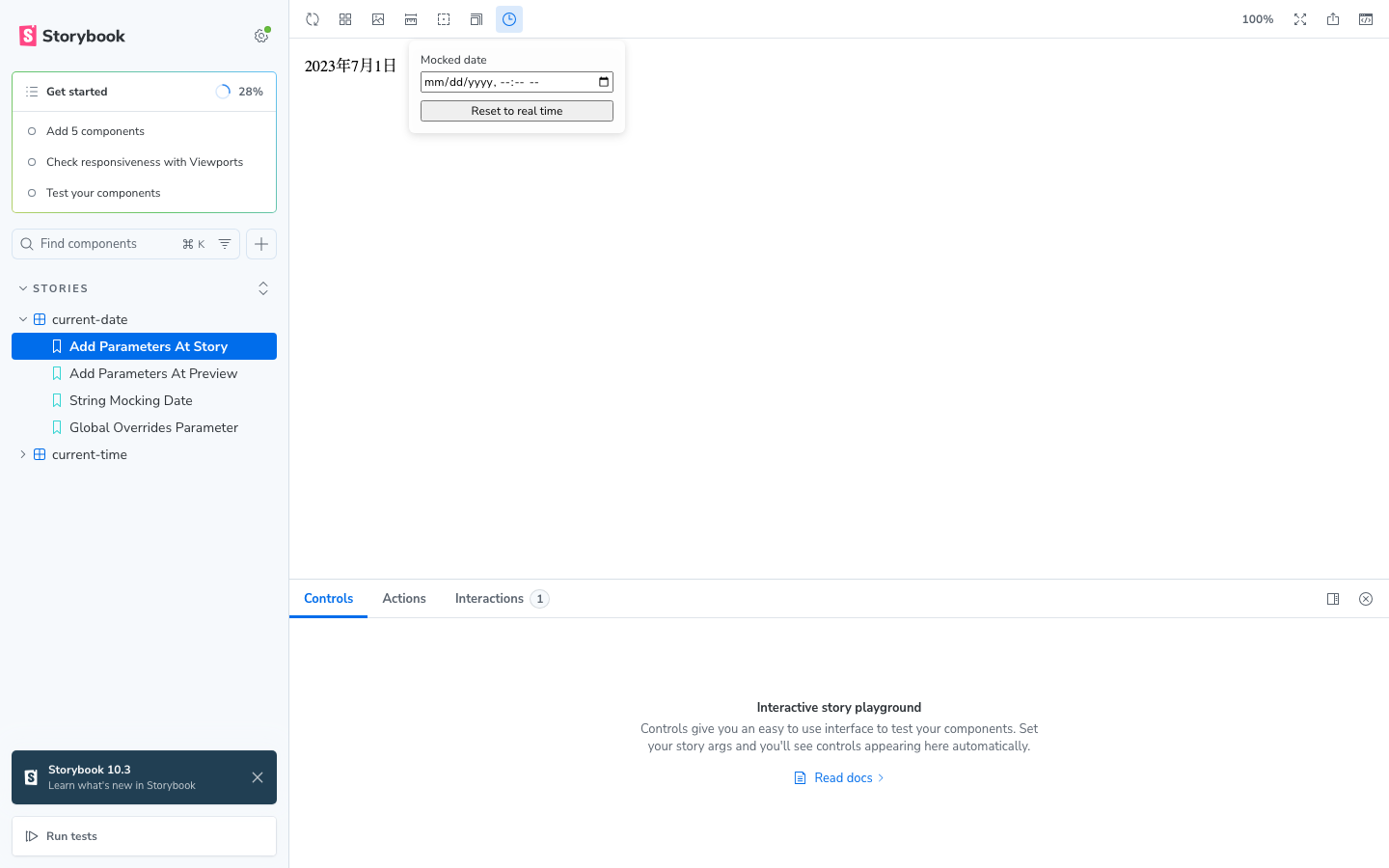
Picking a date stores it in globals.mockingDate and applies the mock immediately to every story you visit, regardless of what parameters.mockingDate is set to. Press Clear override (or clear the input) to drop the override and fall back to the parameter-based mocking. To see a story on the real clock, opt it out with mockingDate: { disable: true } instead — the toolbar only ever swaps the date.
The full precedence with the toolbar in play is toolbar (globals) > story > meta > preview, except that a disabled story stays on the real clock. So a story with its own parameters.mockingDate only shows that date until the toolbar override is engaged.
This is intended for ad-hoc exploration — checking how a "happy birthday" banner looks on the actual day, walking through the same story across a year, etc. — without editing source files. Permanent mocking should still go through parameters.mockingDate so the value lives in version control.
Disabling the toolbar (mock only)
The toolbar comes from the main.ts entry and the mock from the preview.ts one. If you want the date mocking without the clock icon, keep mockDate() in .storybook/preview.ts and leave the addon out of .storybook/main.ts:
// .storybook/main.ts
export default defineMain({
  // 'storybook-addon-mock-date' is intentionally not listed here
  addons: [/* ... */],
});
The mock installs the same way; only the toolbar manager bundle is skipped.
With CSF 3 stories
If your preview.ts still exports a plain object instead of calling definePreview, the main.ts entry alone is enough: Storybook applies the addon's preview annotations for you. To skip the toolbar in that setup, spread the /preview entry into preview.ts instead of listing the addon in main.ts:
// .storybook/preview.ts
import type { Preview } from '@storybook/your-framework';
import mockDate from 'storybook-addon-mock-date/preview';

const preview: Preview = {
  ...mockDate,
  parameters: {
    mockingDate: new Date(2024, 0, 1),
  },
};

export default preview;
Meta / StoryObj stories leave parameters untyped. To have a mockingDate checked anyway, pin it with satisfies:
import type { MockingDateParam } from 'storybook-addon-mock-date';

export const Toast: Story = {
  parameters: {
    mockingDate: {
      now: '2024-01-01T00:00:00',
      fake: ['Date', 'setTimeout'],
    } satisfies MockingDateParam,
  },
};
What gets mocked
By default the APIs that read the current time are replaced; scheduling APIs are opt-in through the fake option (see Faking timers):
'Date'(default) — theDateconstructor and its static methods (Date.now,Date.parse, etc.).'Temporal'(default) — replaces theTemporal.Nownamespace (instant(),zonedDateTimeISO(),plainDateISO(), …), in browsers that ship nativeTemporal(Chrome/Edge 144+, Firefox 139+, Node.js 26+). WhereTemporaldoesn't exist yet the entry is skipped harmlessly. Imported polyfills (temporal-polyfill,@js-temporal/polyfill) bypass the global and are not replaced, but they derive the current time fromDate.now()internally, so theDatefake pins them at millisecond precision.'Intl'(default) — routes zero-argumentIntl.DateTimeFormatformat()/formatToParts()calls, which read the system clock directly rather than going throughDate.now, through the mocked clock. To do that,@sinonjs/fake-timersswapsIntl.DateTimeFormatfor a wrapper while a story is mocked. Code that works with the formatter itself can notice it — leave'Intl'out offakein a story that runs into one of these:- A falsy date argument counts as absent, so
format(0)formats the mocked instant instead of the epoch. - Formatters are not
instanceof Intl.DateTimeFormat, and a subclass of it loses its own methods. - The wrapper copies
Intlwhen the addon loads, so anIntlpolyfill applied later is not visible while a story is mocked. Import polyfills abovestorybook-addon-mock-datein.storybook/preview.ts.
- A falsy date argument counts as absent, so
- Scheduling APIs (
'setTimeout','setInterval','requestAnimationFrame','performance', and the rest) — opt-in; freezes timers so timer-driven UI can be advanced deterministically fromplay.
What stays real
- The timezone. The addon freezes the instant, not the environment:
Date.prototype.getTimezoneOffset(),Intl.DateTimeFormat().resolvedOptions().timeZone, andTemporal.Now.timeZoneId()all keep reporting the host's timezone. To render a story as if in another timezone, launch the browser with one — e.g. Playwright'stimezoneIdoption or theTZenvironment variable. - Values captured before the mock is installed. A module-scope
const now = new Date()is evaluated at import time, before any story's mock is installed, andloadersrun before the addon'sbeforeEach. Likewise, anIntl.DateTimeFormatcreated at module scope is the native one, so its zero-argumentformat()keeps reading the real clock. - Other realms. Web Workers, Service Workers, and other iframes have their own globals; the mock is installed only in the preview iframe.
- Everything outside the JS clock. CSS animations/transitions, the Web Animations API,
IntersectionObserver/ResizeObserver,AbortSignal.timeout(), and network requests are unaffected — disable or mock those separately for stable visual snapshots.
Caveats
Faking setTimeout stalls the render in the Storybook UI
After play, Storybook waits on setTimeout before it reports the story as rendered, so in the Storybook UI a story that fakes setTimeout never finishes rendering: the Interactions panel stays on "RUNS" without listing any step, and STORY_RENDERED is never emitted, so anything waiting for that event waits forever. Tests run through @storybook/addon-vitest take a different path and are unaffected. If a tool captures stories by waiting for STORY_RENDERED, leave setTimeout real in the stories it has to capture.
Don't mix in vi.useFakeTimers()
The addon installs @sinonjs/fake-timers itself, so vi.useFakeTimers() in a mocked story fails with "Can't install fake timers twice on the same global object". Fake timers through the fake option and advance them with advanceMockedTime / runAllMockedTimers instead. A story that has to run its own fake timers can opt out of the addon with mockingDate: { disable: true }.
Multiple stories in a docs page
Stories rendered together on the same docs page (e.g. autodocs pages, MDX pages with several <Canvas> blocks) share one set of mocked globals (Date, Temporal, Intl), because the underlying @sinonjs/fake-timers installs the mock globally. Each story's mockingDate is applied correctly during its initial render — so static snapshots show the expected date for every story — but any code that reads the clock after that render sees whichever story's mock was installed last. Live-updating UI such as countdowns, "time ago" labels that refresh, or running clocks will therefore all converge on a single value across the page.
If you need each story on a docs page to keep its own mockingDate for ongoing new Date() reads, render the stories in separate iframes by setting parameters.docs.story.inline to false:
// .storybook/preview.ts
export default definePreview({
  addons: [mockDate()],
  parameters: {
    docs: {
      story: { inline: false },
    },
  },
});
Each iframe gets its own globals, so the mocks no longer leak between stories. The tradeoff is the extra iframe startup cost per story on the page.
Upgrading from 3.x
4.0 targets Storybook 11 and Node.js 22.12; stay on 3.x for Storybook 10. Stories that pass a bare date keep working; check the rest of your setup against this list.
- Register the addon in
preview.ts. WithdefinePreview(CSF Next, Storybook 11's default) themain.tsentry no longer installs the mock — addmockDate()todefinePreview'saddonsand keepmain.tsfor the toolbar. See Installation. Temporal.Nowand zero-argumentIntl.DateTimeFormat#formatare faked by default. Components that render the current time through them now show the mocked instant, so their snapshots change.fake: ['Date']restores the 3.x behaviour for a story; see What gets mocked for what theIntlwrapper changes.- The object form is typed.
nowis required unlessfakelists scheduling APIs only;{ fake: ['Date'] }without a date is a type error because it mocks nothing. - A zero-delay
setTimeoutruns on the real timer even whensetTimeoutis faked, souserEventandfindBy*no longer hang inplay. Work deferred withsetTimeout(fn, 0)is no longer frozen. - The mock is scoped to the story. It is installed from a
beforeEachhook — so a story's ownbeforeEachsees the mocked time — and removed when the story ends, so nothing leaks into the next story. To keep one story on the real clock under a preview-levelmockingDate, use the newmockingDate: { disable: true }. advanceMockedTimeandrunAllMockedTimersreturn a promise that resolves once the UI has committed. Existing calls still advance the clock right away; addawaitto assert on the result without a hand-written flush.- Import the helpers and types from
storybook-addon-mock-date. The/previewentry now carries only the preview annotations (abeforeEachhook instead ofdecorators), soadvanceMockedTime,runAllMockedTimers,getMockedClockand types such asMockingDateParamare no longer exported from it. - The toolbar's "Reset to real time" is now "Clear override" — same behaviour, honest label: it drops the toolbar date and falls back to the story's own
mockingDate.
